A remote console is most useful when the usual way into a server stops working. On a compatible business PC, Intel AMT can provide Serial over LAN, usually called SOL: a text console carried over the management connection.
While configuring my Proxmox mini PCs, I reached a Linux login prompt through SOL. Then I tried to disconnect by typing ~.. The login prompt treated it as a username and asked for a password.
That small mistake reveals an important distinction: the Linux shell, the login program, and the SOL client each interpret different commands. This guide covers setting up the Linux login console and leaving it cleanly.
Verification status
| Scope | Evidence and limits |
|---|---|
| Environment | Proxmox VE 9.2.21 on AMT-capable mini PCs; the correct serial device must be discovered per host. |
| Previously reported lab observations | An AMT SOL controller was identified on PVH01; a Linux login prompt was reached through SOL on PVH02. |
| Preparation checks | 10 Bash examples passed syntax checks during preparation. This does not validate the optional getty override on hardware. |
| Still to verify | Confirm firmware/client compatibility, the tty assignment, login/logout and reconnection. Test boot redirection separately if required. |
This table summarizes the evidence recorded for this article. It is not a new hardware test or a certification for other versions.
What this setup provides
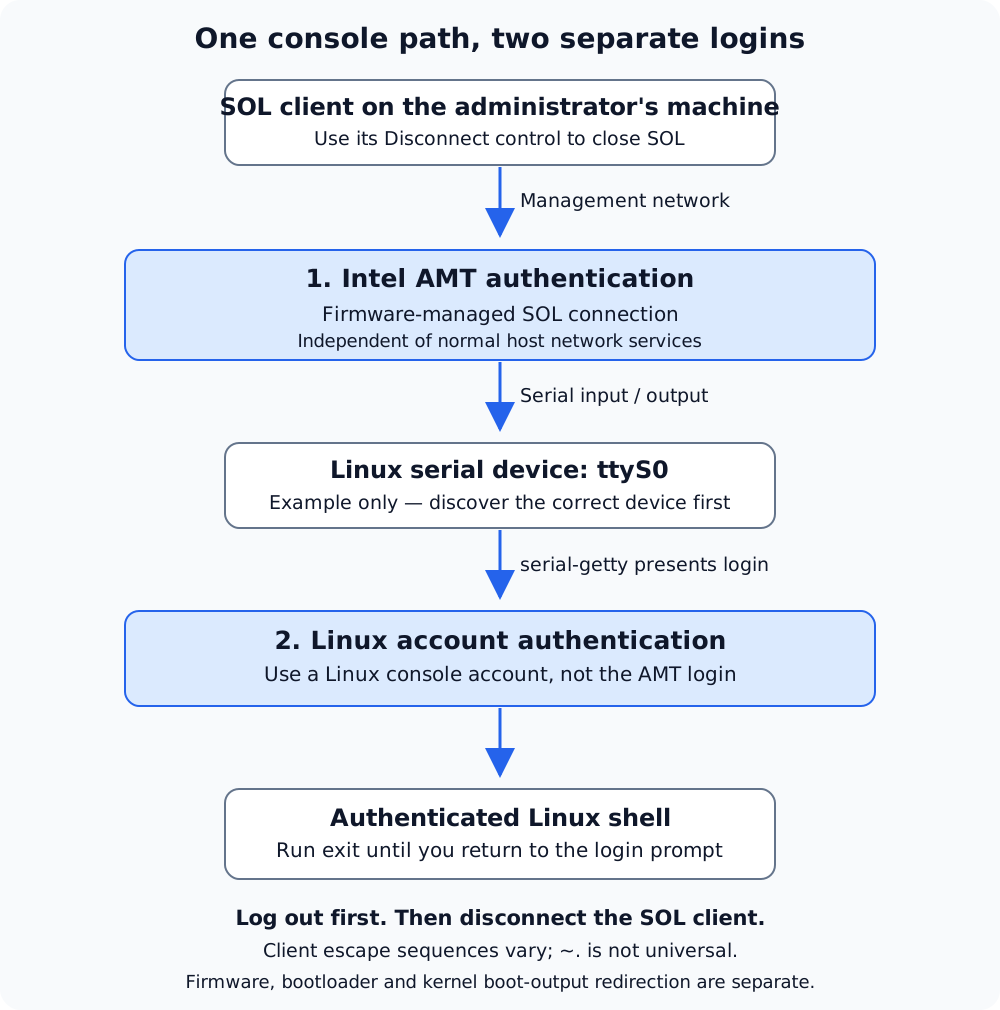
Open the full-size diagram to zoom or inspect its labels.
AMT authentication opens the management connection; Linux authentication opens a host session. Serial input and output travel in both directions. Log out of Linux before using the client’s Disconnect control. The example ttyS0 must be confirmed on your hardware.
There are three separate pieces:
| Piece | What it does |
|---|---|
| Intel AMT firmware and management connection | Makes the SOL session available through a compatible client |
| Linux serial device and serial getty | Presents the Proxmox host’s text login prompt |
| Optional firmware, bootloader, and kernel redirection | Sends earlier boot menus or boot messages to the console |
Enabling a serial getty handles the second row. It does not automatically enable BIOS redirection, a GRUB menu, kernel boot messages, graphical KVM, or a VM’s console.
The management connection is independent of the host’s ordinary network services, but it still depends on supported hardware, firmware configuration, power state, and a reachable management network. SOL is not a promise of access during every possible failure.
My starting point
On PVH01, a Proxmox VE 9.2.21 host, PCI discovery showed an Intel Cannon Lake PCH AMT SOL serial controller at 00:16.3, with PCI ID 8086:a363 and the serial driver. The nearby HECI controller at 00:16.0 used mei_me; that is a different device.
On PVH02, enabling a serial getty on ttyS0 produced the Proxmox welcome message and a Linux login prompt through the SOL session.
Those are observations from my nodes. The device name, PCI address, firmware menu, and client controls on another machine can differ. The generalized commands below need verification against the target host; they were not executed on physical hardware while preparing this article.
Prerequisites
- A machine and firmware that support Intel AMT SOL, with AMT provisioned and SOL permitted.
- A compatible, authenticated SOL client with access to the management network.
- An existing SSH or local console session to the Proxmox host, kept open while testing.
- A root shell for the Linux configuration commands below.
AMT support is a platform feature. An Intel CPU alone does not establish that the machine supports it. Follow the machine vendor’s firmware and provisioning instructions before changing Linux.
Keep AMT on a trusted management network or behind an appropriate private access path. Use the supported encrypted connection mode and certificate validation where available. Do not expose management access directly to the public Internet merely to make the client connect.
1. Identify the SOL controller
Run these read-only checks on the Proxmox host:
|
|
Look for both the PCI serial controller and the kernel’s assignment of a ttyS device. A /dev/ttyS0 node existing by itself is not proof that it belongs to AMT; Linux can expose serial device nodes without a usable physical port behind each one.
Inspect device paths as another clue:
|
|
Match the PCI path to the AMT serial controller where the kernel exposes that relationship. Do not confuse a PCI function such as 00:16.3 with the Linux serial name ttyS0.
2. Inspect the existing console configuration
The rest of this example assumes discovery confirms ttyS0. Change this one variable if your AMT device is different, and keep using the same root shell:
|
|
An inactive or disabled result can be expected before setup. Save the original enabled/active state and any existing overrides in your change notes. The rollback depends on whether this was a new console or an existing one.
Check that another service is not already using the same serial device. Do not run two login programs on one port.
3. Enable the Linux login prompt
Start with the distribution’s existing serial-getty template:
|
|
The service should stay active and run agetty. Open the SOL session and press Enter once or twice. If a login prompt appears and accepts input, the basic console works; no custom service file is required.
If the client exposes speed and framing settings, make them consistent with the serial setup. A common starting point is 115200 baud, 8 data bits, no parity, and one stop bit. Firmware and clients differ, so verify their actual settings rather than assuming that one default applies everywhere.
4. Set a fixed speed only if needed
If the stock template’s baud handling causes a confirmed problem, a service drop-in can set 115200 explicitly. Check that /sbin/agetty exists first. Restarting this getty ends any Linux session currently using it, so perform this step from your separate SSH or local console.
|
|
The empty ExecStart= clears the template’s command before replacing it. %I expands to the instance’s device name. --local-line avoids depending on carrier-detect signaling; vt100 sets the login terminal type.
This does not enable automatic login or change account permissions. Review the effective unit with systemctl cat again, especially if the host already had local overrides.
5. Log in with a Linux account
The AMT connection authenticates you to the management service. The text login prompt authenticates you separately to Linux.
Use a local Linux account permitted to log into the host console. Proxmox web login names such as user@pve are not automatically Linux usernames; use the account’s actual Linux login name where one exists.
Passwords normally produce no visible characters. Type the password and press Enter. Avoid repeated guesses if authentication fails; inspect the account and authentication logs through your existing administrative session.
After logging in, confirm the destination:
|
|
For this example, tty should identify /dev/ttyS0. Check the hostname before running administrative commands, particularly when several nodes have similar welcome screens.
6. Log out, then disconnect
At the Linux shell prompt, end the login session with:
|
|
If you opened nested shells, repeat as needed until you return to the Linux login prompt. Ctrl+D at an empty shell prompt usually also ends that shell, subject to shell configuration.
Then close the SOL connection using the client’s Disconnect, Close session, or equivalent control. That control belongs to the management client, not the remote Linux shell.
Closing the client alone is not a reliable substitute for logging out: a serial login session can remain open and be visible on reconnection. Explicitly return to the login prompt first.
| Where you are | What to do |
|---|---|
| Logged into the Linux shell | Run exit to end that shell |
| At the Linux login prompt | Use the SOL client’s disconnect control |
| In a nested SSH session inside SOL | Exit the inner session, then the host shell, then disconnect SOL |
| Looking for an escape shortcut | Consult that specific client’s help or settings |
Why ~. became a username
Escape sequences are client-specific. For example, some SSH clients interpret ~. at the beginning of a line, but that does not make it a universal AMT SOL command.
In my test, the screen displayed login: ~. and then asked for a password. The characters reached the Linux login program as ordinary input. That was not a Proxmox failure or a request for an AMT password.
If that happens, cancel or let the login attempt finish, return to the login prompt, and use the client’s own disconnect control. Do not keep entering escape sequences as usernames.
Login console versus boot console
Once the host reaches userspace, the getty can offer a login even if no boot messages appeared earlier.
Check the current kernel command line without changing it:
|
|
Linux serial boot output commonly uses a parameter such as console=ttyS0,115200n8, adjusted for the confirmed serial device. Bootloader input/output is configured separately. The ordering of multiple console= parameters can also affect the primary console and automatic getty behavior.
On Proxmox, first determine the boot mechanism and follow its bootloader documentation. A GRUB installation and a systemd-boot/proxmox-boot-tool setup do not share one universal edit-and-update command. Keep a known-good recovery path before changing either. This guide deliberately leaves the working boot configuration alone.
Troubleshooting
| Symptom | Check next |
|---|---|
| Cannot establish any SOL connection | AMT provisioning, SOL permission, client compatibility, management reachability, and power-state support |
| SOL connects but stays blank | Press Enter, verify the tty assignment, and inspect the getty service |
| Readable output but no input | Client input capture, SOL configuration, and another process using the device |
| Unreadable characters | Speed/framing settings and terminal emulation |
| Linux login works, boot messages absent | Kernel and bootloader redirection are separate from the getty |
| Reconnecting reveals an authenticated shell | Log out explicitly before disconnecting; review session handling |
~. appears after login: |
The client passed it through; use the client’s disconnect control |
Do not reboot a working production node as the first diagnostic step. The service and kernel logs often tell you which layer is missing.
Rollback
If you created the optional speed override from scratch, remove only that file and restart the getty from your separate administrative session:
|
|
If the file existed before, restore its saved version instead of deleting it. Do not remove unrelated service overrides.
If the getty was both disabled and inactive before this procedure and you want to undo its activation:
|
|
For other original states, restore the enabled and active states separately from your notes. Disabling a unit does not guarantee a boot-generated getty can never return if kernel-console configuration or another dependency requests it. This procedure did not change AMT firmware or bootloader settings.
Final check before relying on SOL
Verify that you can connect, identify the correct host, log in, run a harmless command, log out, disconnect, and reconnect to a fresh login prompt. Test boot-time visibility separately during a maintenance window if you need that capability.
The useful result is a recovery path you have exercised. On my nodes, the final lesson was simple: exit belongs to the Linux shell, and disconnect belongs to the SOL client.
Continue reading
- Proxmox bridges and VLANs — Understand the normal host and guest network paths alongside the management console.
- ThinkPad T420 administration laptop — Prepare a focused Linux client for day-to-day administration.
- Proxmox Backup Server — Pair recovery access with a backup and restore plan.
References and image provenance
- Intel AMT documentation
- systemd: systemd-getty-generator
- Linux kernel: serial console
- util-linux: agetty
- Proxmox VE: host bootloaders
Live reference retrieval was unavailable during preparation. Check the installed agetty and systemd manuals and your vendor’s current AMT instructions before applying the generalized examples.
The cover is an AI-generated editorial illustration, not a photograph, actual console capture, or wiring diagram. Its generation prompt is stored alongside the image asset.