A dashboard is useful only when you know what its data represents. Start by proving that Prometheus can scrape a target and Grafana can query Prometheus. Add host metrics, container metrics, logs and notifications after that path works.
This guide consolidates the two earlier monitoring-stack posts. It replaces their overlapping all-in-one examples with a smaller foundation and explains the prerequisites for extending it. The commands are examples, not evidence of a deployment tested during this update.
Verification status
| Scope | Evidence and limits |
|---|---|
| Environment | Docker host or VM with the Compose plugin; Prometheus and Grafana images must be selected and recorded by the reader. |
| Previously reported lab observations | The consolidated two-service example is proposed configuration; no runtime result is claimed for it. |
| Preparation checks | 6 Bash blocks passed syntax checks and 3 generated YAML files parsed during preparation. |
| Still to verify | Run Compose and promtool validation, start the selected releases, and confirm the self-scrape query succeeds from Grafana. Test backups separately. |
This table summarizes the evidence recorded for this article. It is not a new hardware test or a certification for other versions.
Know which component does what
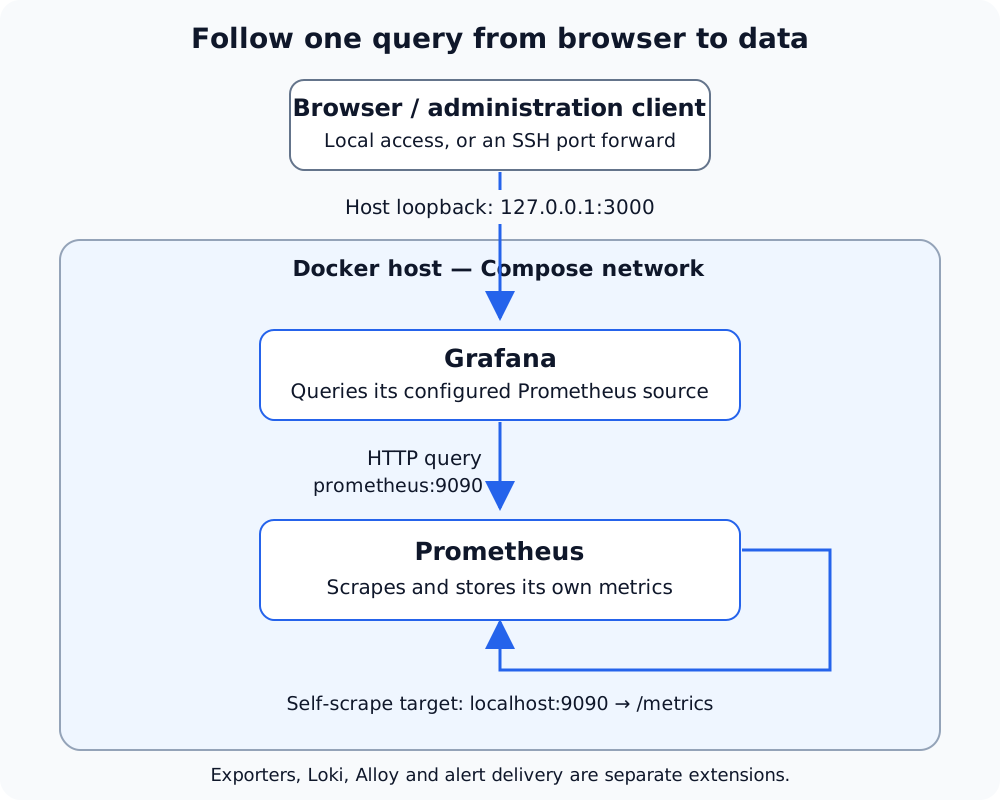
Open the full-size diagram to zoom or inspect its labels.
The initial two-service deployment. Arrows show requests; replies return along those connections. On a remote host, use an SSH tunnel for browser access. Container-local localhost and the host’s loopback address are different endpoints.
| Component | Responsibility |
|---|---|
| Prometheus | Scrape metrics, store time series and evaluate alert rules |
| Grafana | Query configured data sources and display results |
| Node Exporter | Expose operating-system metrics for the environment it can observe |
| cAdvisor or another suitable exporter | Expose container metrics, subject to runtime and permission requirements |
| Loki | Store and query logs |
| Alloy | Collect and forward telemetry; not a replacement for a queryable metrics database |
| Alertmanager | Route Prometheus alerts to configured receivers |
The initial deployment below includes Prometheus and Grafana only. It scrapes Prometheus itself. A successful self-scrape is a pipeline check, not proof that your Proxmox hosts or application containers are monitored.
Prerequisites and image selection
Use a dedicated Docker host or VM with Docker Engine and the Docker Compose plugin, persistent storage, and a backup plan. This example creates a new directory under your home folder. Do not overwrite an existing monitoring deployment with it.
|
|
Select supported image releases from the official projects, including an explicit tag or digest. The old posts’ image tags are historical examples, not current security recommendations. Enter your reviewed image references when prompted:
|
|
For example, the repositories are prom/prometheus and grafana/grafana; append versions you have reviewed rather than using an unversioned reference. The exports apply to this shell. Retain the chosen references and password in your approved configuration/secret store so another session can manage the same deployment. Do not commit secrets to Git or share rendered Compose configuration containing the password.
Create the configuration
Prometheus starts with one target and a seven-day time retention setting:
|
|
The two containers use the Compose project’s default network. Grafana reaches Prometheus by its service name, not through Grafana’s own localhost.
The host ports bind only to loopback. Use a local browser, an SSH tunnel, or a deliberately configured authenticated proxy. This example does not configure Traefik, public access, or TLS.
The Grafana password setting initializes a new database. Changing the environment value does not necessarily reset the administrator password in an existing persistent Grafana database; use the supported password-reset procedure for your installed release.
Verify the whole initial path
|
|
Wait for a scrape interval after startup. The query should return a successful response containing a sample value of 1 for the Prometheus target. If the response is empty or reports 0, inspect the target and logs before importing dashboards.
Open Grafana at http://127.0.0.1:3000, log in, and select the provisioned Prometheus source in Explore. Run up{job="prometheus"} there too. This checks Grafana’s access to Prometheus, which separate readiness responses alone cannot prove.
For a remote Docker host, forward the two loopback ports with your existing SSH access. Run this on your client, replacing the example destination:
|
|
Choose different local ports if those are already occupied on your client.
Add host and container metrics deliberately
Install a supported Node Exporter on the host you actually want to measure, or use its documented container deployment with the required namespaces and filesystem mounts. An exporter inside an LXC can observe a different environment from the Proxmox host. Docker NAT alone is not what determines metric accuracy.
Add its reachable management address to the existing scrape_configs list. The following is a fragment, not a replacement file:
|
|
Restrict exporter access to the intended scraper. Validate the configuration with promtool, restart Prometheus after saving it, and query up{job="node"}. Use host metrics in dashboards only after confirming the target and labels represent the expected machine.
For container metrics, follow the selected exporter’s deployment instructions for your Docker version, cgroup configuration and storage driver. Do not add privileged mode or broad host mounts without understanding why the collector requires them. Dashboard IDs are not compatibility guarantees; check the metrics, labels and data source expected by an imported dashboard.
Add logs as a separate pipeline
For log collection, see the Alloy and Loki guide, checking its versions and validation limits before adapting it. The pipeline is collector → Loki → Grafana. Configure Loki as a Loki data source; Alloy’s metrics endpoint is not a Prometheus query API.
Before deploying, confirm whether the collector uses Docker discovery/API access, JSON files, or the system journal. The selected method needs matching mounts, permissions, labels and persistent collection state. A filesystem glob is not Docker API discovery, and mounting a Docker socket read-only does not turn its API into a read-only API.
Configure retention using the mechanism supported by the selected Loki schema and storage backend. A retention duration alone is not proof deletion is active. Never reclaim space by manually removing arbitrary chunk files from a live indexed store.
Add alerts and test delivery
An alert rule, an Alertmanager route and an external notification are separate checks. Validate rule files with promtool, configure Prometheus to reach Alertmanager, validate Alertmanager configuration with its version’s amtool, and send a controlled test through the full route.
Do not assume Alertmanager expands shell variables in a bind-mounted YAML file. Use the receiver’s supported secret-file fields or a deliberate configuration-generation step. A value such as `${TELEGRAM_CHAT_ID}` in an ordinary file is not automatically replaced by Docker Compose.
Also distinguish a failing scrape from a target removed entirely from the configuration. An up == 0 rule checks existing failed scrapes; it does not establish an inventory of every service that ought to exist. Container disappearance may remove a time series instead of leaving a durable failure value.
Maintenance and rollback
Back up configuration and use a supported consistent backup method for persistent data, especially Grafana’s database. Record the image references used for each working deployment. A time retention setting is not a disk-capacity guarantee; monitor growth and leave free space for normal operation.
Before an upgrade, review the release notes and data-format compatibility. Returning to an older image is not always safe after a database migration. Keep a tested restore path as well as the previous configuration.
To stop the example while retaining its named volumes:
|
|
Do not add --volumes unless you intend to delete the stored monitoring data. Restart using the same Compose project identity and the recorded image references. A fresh volume creates a fresh deployment, not a restoration of your historical data.
Continue reading
- Alloy and Loki log collection — Explore the separate log pipeline after verifying the metrics path.
- Docker Compose health checks — Understand why a running container and a ready service are different states.
- Proxmox Backup Server — Plan guest recovery alongside monitoring; dashboards do not replace backups.
Validation and references
The update consolidates the previous May 9 and May 17 articles. It removes unsupported claims of a fixed RAM footprint, complete ready-made dashboards, and confirmed incident outcomes. Bash syntax and configuration structure can be checked locally; this example has not been deployed or exercised against a live Docker host during preparation. Live upstream retrieval was unavailable.
- Prometheus installation and Docker deployment
- Prometheus configuration
- Node Exporter
- Grafana Docker installation
- Grafana data source provisioning
- Loki retention
Check the documentation for the exact releases selected before deploying. A useful first result is modest and observable: a real scrape, a successful query from Grafana, and a clear plan for the next target.